
Table of Contents
Instant Moulding Quote gives your website visitors an interactive way to upload a STEP model, review its geometry, configure manufacturing options, receive an indicative price and request a formal quotation.
The plugin is intended for compression moulding and similar manufacturing processes. All prices generated by the system are indicative estimates based on the commercial assumptions configured by the website administrator. A formal quotation should still be reviewed by your engineering and commercial teams.
Main customer journey
The quote journey contains four stages:
- Email verification
- Component upload
- Quote configuration
- Formal quote request
Email verification
Before uploading a component, the customer enters their email address.
The website sends a six-digit, one-use verification code. The customer must enter the correct code before continuing.
Verification codes expire automatically and are removed after use, preventing the website from building an ever-growing list of codes.
Component upload
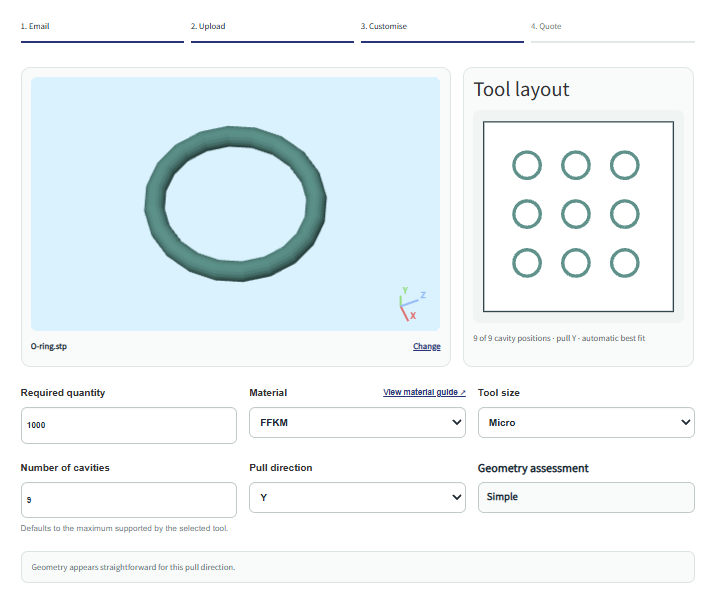
The customer can upload a STEP or STP file up to 50 MB.
The system analyses the model and calculates information including:
- Overall dimensions
- Part volume
- Surface area
- An estimated wall-thickness range
- Suitable pull directions
- Possible undercuts
- Faces that may have limited draft
- Thin sections that may be difficult to machine
- General geometry complexity
- Suitable standard tool sizes
- Maximum available cavity count
The part is also displayed in an interactive 3D viewer.
Geometry assessment is automated and should be treated as an initial manufacturing indication. Complex components may still require manual engineering review.
Quote configuration
The customer can configure:
- Required quantity
- Material
- Tool size
- Number of cavities
- Pull direction
The indicative tooling cost and price per part update automatically as these selections change.
Formal quote request
The customer can submit:
- Their name
- Company
- Telephone number
- Required delivery date
- Project details
- An optional PDF drawing or specification
The administrator receives the quote information, uploaded STEP file and optional PDF drawing by email.
The customer also receives a confirmation email.
Installing the plugin
- Open the WordPress administration area.
- Go to Plugins → Add New Plugin.
- Select Upload Plugin.
- Upload the supplied ZIP file.
- Select Install Now.
- Activate the plugin.
To display the quote application, add the following shortcode to a WordPress page:
[moulding_instant_quote]
Only one quote application should normally be added to a page.
General settings
Open Moulding Quote → General in the WordPress administration area.
App language
The public quote application supports:
- English
- French
- Spanish
- Simplified Chinese
- Italian
- German
When Automatic is selected, the application uses the WordPress website language where that language is supported. If the WordPress language is not supported, English is used.
The WordPress administration interface follows the administrator’s WordPress language automatically.
Licence number
A valid licence number is required to use the geometry analysis and instant-pricing service.
Enter the licence exactly as supplied. Avoid adding spaces before or after the licence number.
The licence is checked automatically. You do not need to update the processing service manually when a licence is renewed or replaced.
A licence may stop working if it is:
- Expired
- Disabled
- Inactive
- Over its permitted activation limit
- Entered incorrectly
Use the licence link beneath the field to purchase or renew a licence.
Privacy policy URL
Enter the full URL of your website’s privacy policy.
This link is displayed to customers during the quote journey. Your privacy policy should explain how customer contact information and uploaded files are used, processed and retained.
Quote notification email
This is the email address that receives formal quote requests.
The notification includes:
- Verified customer email address
- Customer contact information
- Project details
- Uploaded STEP file
- Optional PDF drawing
- Selected material
- Selected tool
- Requested quantity
- Cavity count
- Pull direction
- Geometry assessment
- Indicative tooling cost
- Indicative price per part
Use an address that is monitored by your quotation or sales team.
Appearance settings
Open Moulding Quote → Appearance.
The following colours can be customised:
Primary colour
Used for major buttons, active stages, links and highlighted interface elements.
Choose a colour that is clearly visible against the panel and page backgrounds.
Text colour
Used for the application’s principal text.
A dark colour is normally recommended for readability.
Panel colour
Used for highlighted panels, estimate boxes and supporting interface areas.
A light colour normally provides the best contrast.
3D viewer background
Controls the background colour behind the uploaded component in the 3D viewer.
Choose a colour that contrasts with the component colour so that edges and details remain visible.
Pricing settings
Open Moulding Quote → Pricing.
These values control the commercial assumptions used by the indicative-pricing calculation.
Currency
Select the currency used for tooling and piece-price estimates.
Available options include:
- GBP
- EUR
- USD
- CAD
- AUD
- CHF
- CNY
- JPY
- NZD
- SEK
- NOK
- DKK
- PLN
Changing the currency does not automatically convert existing costs using an exchange rate. All material, tool and hourly costs must already be entered in the selected currency.
For example, if EUR is selected:
- Material cost must be entered in euros per kilogram.
- Tool raw cost must be entered in euros.
- Manufacturing and machining rates must be entered in euros per hour.
Manufacturing cost per hour
Manufacturing cost per hour is the total hourly production rate used while parts are being manufactured.
It should normally include the costs directly associated with running the moulding process, such as:
- Moulding machine operating cost
- Operator labour
- Normal supervision
- Energy consumption
- Routine production overhead
- Normal production support
- Other hourly costs associated with running the process
This is not the cost of manufacturing the tool. Tool machining is controlled separately by the machining cost per hour.
A practical way to determine this value is:
Manufacturing hourly rate = machine rate + direct labour rate + applicable hourly production overhead
The system calculates production time using:
- Material cure time
- Complexity handling allowance
- Required quantity
- Number of cavities
More cavities produce more parts per cycle and can therefore reduce the production time and manufacturing cost per part.
Machining cost per hour
Machining cost per hour is the fully burdened hourly rate for manufacturing the mould tool.
It can include:
- CNC machine cost
- Machinist labour
- CAM or programming allocation
- Tooling and cutter consumption
- Energy
- Machine maintenance allocation
- Inspection associated with tool manufacture
- Applicable machining overhead
This value should represent the total average cost of one hour of tool machining.
It is used only in the tooling-cost calculation and is separate from the production manufacturing rate.
A practical way to determine this value is:
Machining hourly rate = machine cost + machining labour + applicable machining overhead
The estimated machining hours are multiplied by this rate and added to the selected tool’s raw cost.
Tool settings
Open Moulding Quote → Tools.
Each row represents a standard tool size that customers may select.
The plugin automatically removes tool sizes from the public selector when the uploaded component cannot fit inside them for the selected pull direction.
Name
The customer-facing name of the tool.
Examples:
- Micro
- Small
- Medium
- Large
Use names that customers and your quotation team can understand.
Length
The usable or defined overall tool length in millimetres.
Width
The usable or defined overall tool width in millimetres.
Height
The available tool height in millimetres.
The component must fit within the tool height along the selected pull direction.
Raw cost
The starting cost of the unmachined tool, tool blank, bolster, plate set or other base tooling arrangement.
This is the tool cost before cavity machining time is added.
Raw cost can include:
- Tool steel or aluminium
- Standard plates
- Bolster
- Basic bought-in tool components
- Initial preparation
- Any fixed starting cost associated with that tool size
The indicative tooling calculation is:
Tooling cost = tool raw cost + estimated machining hours × machining cost per hour
Waste per shot
Waste is the volume of additional moulding material consumed during each production cycle because of the tool and moulding arrangement.
It is entered in cubic centimetres per shot.
Waste can include:
- Runners
- Sprues
- Feed channels
- Flash
- Transfer-pot residue
- Material left in feed areas
- Material remaining in the tool
- Process allowance
- Other material that is consumed but does not form part of the finished components
Waste is applied once per moulding shot, not once per component.
For example:
- Part volume: 10 cm³
- Cavities: 4
- Tool waste: 20 cm³
The material consumed per shot is:
10 cm³ × 4 cavities + 20 cm³ waste = 60 cm³ per shot
A larger cavity count may reduce the waste allocated to each finished component because the tool waste is shared across more parts in every shot.
Enter a realistic average for the particular tool design. If the process is effectively runnerless and has very little residual material, use a low value. If it uses substantial runners, sprues or transfer material, use a higher value.
Tool fit and cavity layout
The system estimates whether components fit by considering:
- Tool length
- Tool width
- Tool height
- Part dimensions
- Selected pull direction
- Cavity spacing allowance
- Edge allowance
- Possible rotated cavity layouts
The customer is only offered tools that can accommodate at least one cavity.
The default cavity count is the maximum number that fits within the selected tool using the automatic layout calculation.
This layout is indicative. Final cavity positioning, runner design, inserts, cooling, heating, clamping and tool strength require engineering review.
Material settings
Open Moulding Quote → Materials.
Each row represents a material available to customers.
Materials page URL
This optional URL links to a public material guide.
When entered, a View material guide link appears beside the material selector and opens in a new browser tab.
The material guide can explain:
- Available materials
- Typical applications
- Temperature resistance
- Chemical resistance
- Hardness ranges
- Colours
- Certifications
- Minimum order requirements
- Typical lead times
Name
The customer-facing material name.
Examples:
- EPDM
- Silicone
- FFKM
- NBR
- Natural Rubber
- ABS
Include grades or hardness values in the name where they materially affect pricing.
Cost per kilogram
The purchase cost of the raw material per kilogram, entered in the selected currency.
The system calculates material cost using:
- Part volume
- Number of cavities
- Tool waste per shot
- Material density
- Required number of shots
- Material cost per kilogram
Consider whether the entered cost should include:
- Base polymer or compound cost
- Colour
- Additives
- Normal material preparation
- Purchasing or handling overhead
- Expected commercial material loss
Do not include tool waste in the material cost per kilogram because tool waste is configured separately for each tool.
Cure time
The material’s expected processing or cure time per moulding cycle, in seconds.
This is the base cycle time before the geometry handling allowance is added.
For thermoset, rubber or silicone processes, this may represent the expected cure time in the mould.
For other processes, it can be used as the base processing-cycle time.
The system calculates the estimated cycle time as:
Cycle time = material cure time + geometry handling allowance
Density
Material density in grams per cubic centimetre.
Density converts the calculated material volume into material mass.
The material mass is then multiplied by the material cost per kilogram.
Use a density that represents the actual production compound wherever possible.
Complexity settings
Open Moulding Quote → Complexity.
The geometry analysis classifies the component as:
- Simple
- Normal
- Difficult
The assessment can change when the customer changes the pull direction.
The system considers indicators such as:
- Possible undercuts
- Limited draft
- Thin sections
- Surface and geometric complexity
- Machining difficulty
- Selected pull direction
The assessment is deliberately cautious. Notes such as “may contain undercuts” indicate that the geometry should be reviewed; they are not a definitive manufacturing approval or rejection.
Handling allowance
Handling allowance is the additional production-cycle time assigned to each geometry category.
It is entered in seconds per shot.
It can represent additional time for:
- Loading inserts
- Positioning material
- Removing complex components
- Manual demoulding
- Cleaning
- Flash handling
- Inspection
- Other complexity-related production activity
The total estimated production cycle is:
Cycle time = material cure time + handling allowance
A higher handling allowance increases production hours and therefore increases the estimated price per part.
Machining setup
Machining setup is the fixed number of toolmaking hours allocated to each complexity category.
It can represent:
- CAM preparation
- Programming
- Workholding setup
- Datum setting
- Electrode preparation
- Tool changes
- Initial inspection
- General toolmaking preparation
This time is added before the volume-based machining time is calculated.
For example:
Estimated machining hours = machining setup hours + volume-based machining hours
More complex components will normally require more setup time.
Removal rate
Removal rate represents the volume of tool material that can be removed by machining in one hour.
It is entered in cubic centimetres per hour.
This value relates to machining the mould tool—not moulding the customer’s production material.
The system uses the uploaded part volume and cavity count as a practical proxy for the amount of cavity machining required.
The approximate calculation is:
Volume-based machining hours = total cavity volume ÷ removal rate
Where:
Total cavity volume = component volume × number of cavities
The complete machining-time estimate is:
Machining hours = setup hours + (component volume × cavities ÷ removal rate)
A high removal rate means the tool is expected to be machined more quickly.
A low removal rate means machining is slower and the estimated tooling cost is higher.
Typical reasons for selecting a lower removal rate include:
- Small cutters
- Deep cavities
- Fine features
- Thin ribs
- Difficult access
- Tight internal radii
- Hard tool materials
- Complex surfaces
- Additional finishing requirements
- Possible undercuts
- Limited machining access
The removal rate should be treated as an average commercial assumption rather than a guaranteed physical machining rate.
A recommended approach is to review previous tooling projects and compare:
- Total cavity volume
- Recorded machining hours
- Geometry complexity
You can then establish practical simple, normal and difficult removal rates based on your own equipment and tooling methods.
How the indicative price is calculated
Number of shots
The system calculates the required number of moulding cycles as:
Number of shots = required quantity ÷ number of cavities, rounded up
Example:
- Required quantity: 1,000 parts
- Cavities: 4
Required shots:
1,000 ÷ 4 = 250 shots
Cycle time
Cycle time = material cure time + complexity handling allowance
Production hours
Production hours = number of shots × cycle time ÷ 3,600
Material volume per shot
Material volume per shot = part volume × cavities + tool waste
Material cost
Material volume is converted to mass using the selected material density.
The calculated mass is then multiplied by the material cost per kilogram.
Production cost
Production cost = production hours × manufacturing cost per hour
Indicative price per part
Price per part = (total material cost + total production cost) ÷ required quantity
The displayed piece price does not include tooling cost. Tooling is shown separately.
Tool machining hours
Machining hours = complexity setup hours + (part volume × cavities ÷ complexity removal rate)
Indicative tooling cost
Tooling cost = selected tool raw cost + machining hours × machining cost per hour
These calculations provide consistent early-stage estimates. They do not replace detailed process planning, tool design or commercial review.
Action tracking
Open Moulding Quote → Action tracking.
Tracking snippets can be added at four successful customer actions:
- Verification email sent
- Email successfully verified
- Part uploaded and analysed
- Formal quote request sent
Each field can contain a conversion or analytics snippet from a provider such as:
- Google Analytics
- Google Ads
- Microsoft Advertising/Bing
- Meta
- Another trusted tracking provider
Different providers can be used at different stages.
A snippet runs only after the relevant action succeeds. For example, the formal-quote snippet does not run if the email submission fails.
Only add tracking code from a provider you trust. Never paste private API secrets into a browser tracking field.
The plugin also emits the following browser events:
miq:email_sentmiq:email_verifiedmiq:part_uploadedmiq:quote_sent
These events can be used by a developer or tag-management system for more advanced tracking.
Geometry assessment
The geometry assessment is interactive and depends partly on the selected pull direction.
The system may display short warnings including:
- This pull direction may contain undercuts.
- Some faces may have limited draft.
- Thin sections may be difficult to machine.
- Complex geometry — engineering review required.
These messages are intentionally cautious.
The automated analysis cannot fully determine:
- Final parting-line design
- Insert strategy
- Side actions
- Exact flash line
- Final draft suitability
- Surface-finish requirements
- Tool steel selection
- Heating or cooling design
- Exact runner and feed design
- Final tool strength
- All manufacturability risks
Complex or unusual parts should be reviewed by an experienced engineer before a formal price or manufacturing commitment is issued.
Multilingual operation
The public application supports English, French, Spanish, Simplified Chinese, Italian and German.
The customer journey, status messages and customer emails use the selected public application language.
Administrator quote emails and the WordPress plugin settings follow the WordPress administration language where supported.
Important pricing disclaimer
All prices generated by Instant Moulding Quote are indicative estimates.
Actual pricing may change following review of:
- Complete component geometry
- Tolerances
- Material specification
- Surface finish
- Colour
- Testing
- Certification
- Tool construction
- Cavitation
- Parting line
- Undercuts
- Inserts
- Flash requirements
- Production quantities
- Packaging
- Inspection requirements
- Delivery requirements
- Commercial terms
A formal quotation should be issued only after the component, drawings and project requirements have been reviewed by your team.